
Hello!
1. We have a webapp (telegram mini game) built with typescript angular, we are using sfs js library.
2. Everything is working perfectly locally.
3. We have already hosted the server & database on overcast.
4. If we play the webapp from standalone computer - web browser, client has no problems connecting.
5. But, if we play the web app from mobile it fails instantly.
6. The sfs client fires socket error callback with no reason - event object is completely empty {}.
7. Server side does not fire any errors.
8. Connect config is host/port/zone (note this works on standalone web browser).
Any breadcrumbs whatsoever on how to debug this is much appreciated.
Thank you!
Client fails to connect from telegram web app mini game
-
YoungDeveloper
- Posts: 74
- Joined: 02 Mar 2014, 21:38
- Location: Latvia

Re: Client fails to connect from telegram web app mini game
Hi,
is a connection ever created on the server side? You can verify it by checking the server logs. Every connection attempt is logged.
Have you checked if you any have Javascript/browser errors on the client side?
Sounds like it could be a cross origin issue or maybe something related to accessing a non-TLS resource?
Cheers
is a connection ever created on the server side? You can verify it by checking the server logs. Every connection attempt is logged.
Have you checked if you any have Javascript/browser errors on the client side?
Sounds like it could be a cross origin issue or maybe something related to accessing a non-TLS resource?
Cheers
-
YoungDeveloper
- Posts: 74
- Joined: 02 Mar 2014, 21:38
- Location: Latvia
Re: Client fails to connect from telegram web app mini game
1. I purchased a ssl certificate and uploaded it on smartfox 2x server converted to .jks file.
2. When trying to connect to /admin panel with /8443 port i get:
3. If i try to connect via client
Which is what you mentioned, could please give some hints on how to solve this.
Thank you very much Lapo.
-Karl
2. When trying to connect to /admin panel with /8443 port i get:
Code: Select all
Bad Request
This combination of host and port requires TLS.
3. If i try to connect via client
Code: Select all
WebSocket connection to 'wss://ec2-hostname-on-overcast.amazonaws.com:8443/BlueBox/websocket' failed: Which is what you mentioned, could please give some hints on how to solve this.
Thank you very much Lapo.
-Karl
-
YoungDeveloper
- Posts: 74
- Joined: 02 Mar 2014, 21:38
- Location: Latvia
Re: Client fails to connect from telegram web app mini game
1. Also it seems that i need to create public sub folders /.well-known/pki-validation for certificate validation.
So validator could access url (example url):
2. I created them servlet under www and ROOT, not sure which is considered first server public folder.
After folders refresh my newly created folders are gone, but they are still there - because i cant create a new one and cant access them no more.
Seems that this viewer does not render hidden holders with . [dot].
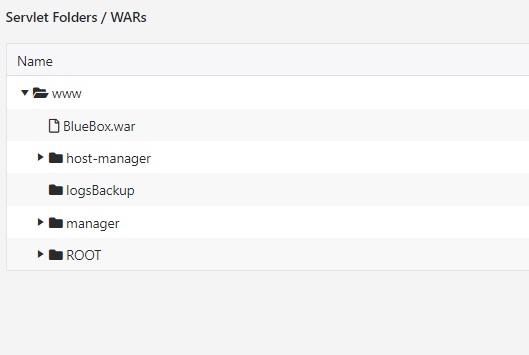
So validator could access url (example url):
http://ec2-my-overcast-host.amazonaws.com/.well-known/my-validation-text-file.txt
2. I created them servlet under www and ROOT, not sure which is considered first server public folder.
After folders refresh my newly created folders are gone, but they are still there - because i cant create a new one and cant access them no more.
Seems that this viewer does not render hidden holders with . [dot].
Re: Client fails to connect from telegram web app mini game
Hi,
the first test you should do is pointing your browser to:
https://<your-host>:8443/admin
Can you access the page without errors? If so your certificate is deployed correctly.
I have no idea what this is, but it's not required to deploy a TLS certificate.
Servlet cannot be deployed in the ROOT/ folder. They need their dedicated folder, as in any servlet container. Typically you would want to deploy the servlet as a .war file, under www/
Cheers
the first test you should do is pointing your browser to:
https://<your-host>:8443/admin
Can you access the page without errors? If so your certificate is deployed correctly.
1. Also it seems that i need to create public sub folders /.well-known/pki-validation for certificate validation.
I have no idea what this is, but it's not required to deploy a TLS certificate.
ec2-hostname-on-overcast.amazonaws.com:8443
Servlet cannot be deployed in the ROOT/ folder. They need their dedicated folder, as in any servlet container. Typically you would want to deploy the servlet as a .war file, under www/
Cheers